Build and run end-to-end tests from your coding agent with the Functionize MCP server
Functionize Studio now connects to Claude Code, Cursor and GitHub Copilot over MCP, so your coding agent can build, run and verify tests against your real app without leaving the chat.

TL;DR
- Functionize Studio now has an MCP server. Your coding agent can build, run and debug end-to-end tests against your running app without leaving the chat.
- It works with Claude Code, Claude Desktop, Cursor and GitHub Copilot in VS Code, plus any client that supports MCP.
- Studio maps each code change to the UI flows it affects, runs those flows, and reports what failed and at which step.
- Setup is two commands in Claude Code, or one server URL in other clients. You sign in with your Functionize account, with no API key.
- This release also adds orchestrations, test folders, conditionals and loops, and drag-and-drop test editing.
Ask a coding agent to split your claims submission form into two steps, moving the incident details and supporting documents onto the second page, and it will handle the change well. It restructures the layout, carries the validation rules across, updates the API payload, and likely adds a few unit tests before reporting that the work is done.
What it can't report is whether a policyholder can still submit a claim.
A coding agent can hold an entire repository in context, trace a change across every file it touches, and recall details most of the team forgot long ago. Its understanding stops at the source code, though. It has never clicked through your application, so it has no way to notice that the backend still requires a date of loss field, or that your team considers a claim submitted only once it reaches an adjuster's queue.
Agent-written code is outpacing testing, and it needs an independent check
Keeping testing in step with development has always been a challenge, and coding agents have made the gap much wider. Agents now write a fast-growing share of all code, at a velocity most QA processes were never built to absorb. Testing capacity hasn't grown with it, so more unchecked changes reach production, where they show up as outages, lost revenue and customers who stop trusting the product.
The obvious response is to have the agent write the tests as well, and that does catch some defects. The problem is that those tests come from the agent's own interpretation of the change. Testers know this as the oracle problem: a check is only as reliable as its source of truth about correct behavior. When the agent misreads the intent of a change, its tests inherit the same misreading and pass anyway. Agent-written code needs an independent check, one that starts from what the change was supposed to do and tests it against the running application, not against the same assumptions that produced the code.
Functionize Studio learns how your app behaves by running it
Studio works from the running application instead. It exercises your app in a browser the way a user would, whether that means signing in, searching for a policy, working through the five screens of a claim form, or completing a wire transfer. With each run it refines a model of every page and the elements on it, so when a button moves or a form gains a field, Studio resolves the element from that model rather than failing on a stale selector.
Until now, nothing connected what the coding agent knows about the code with what Studio knows about the running application.
The MCP server lets your coding agent run Studio tests from the chat
Today we're releasing the Functionize MCP server. MCP, the Model Context Protocol, is the open standard coding agents use to work with external tools. Once Studio is connected, your agent can call Studio's tools to create, run and inspect tests without leaving the conversation you're already in.
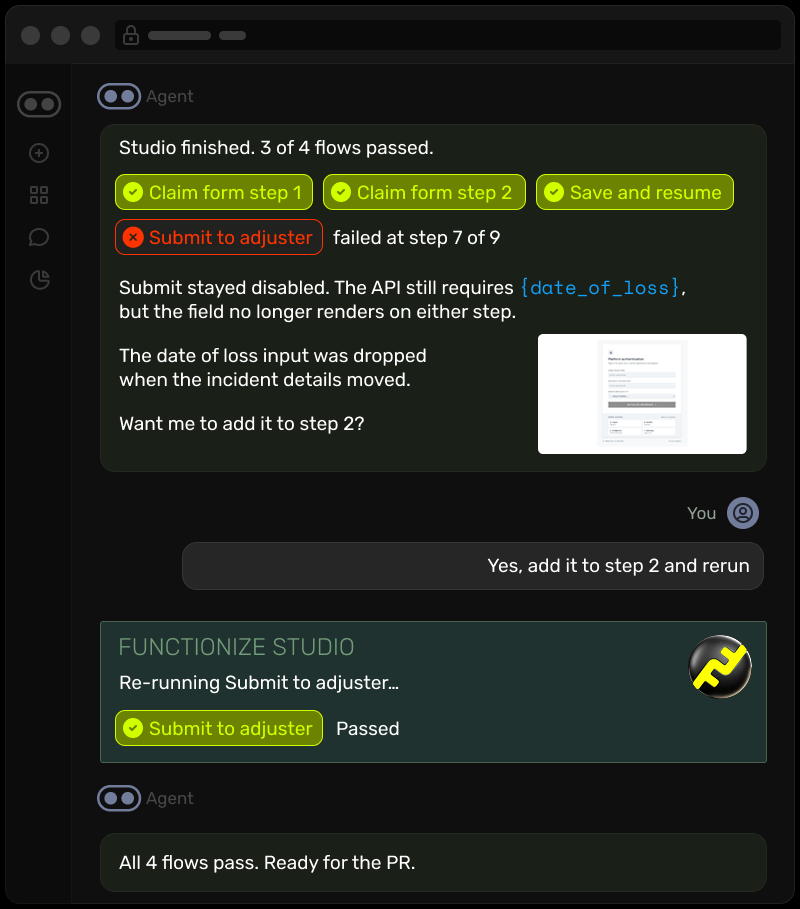
Go back to the claims submission form from the start of this post, where the agent split the form into two steps and moved the incident details and supporting documents to the second page. When that change is finished, you ask the agent to verify it. The agent tells Studio what the change was meant to accomplish and which code it modified, and Studio maps that to the affected flows: both steps of the claim form, save and resume, and the handoff to the adjuster. It runs those flows against your application and reports back in the chat with what passed, what failed, and the first step where something went wrong.
Here, the submit test fails because the date of loss field is still required but no longer appears on either page, and Studio points to the step where the flow broke. You fix it before the pull request merges, rather than after other changes have landed on top of it.
Example prompts for building, running and fixing tests
You make requests in plain language, for example:
- "Build a smoke suite for claims intake and run it."
- "Run the regression suite and tell me what failed."
- "Why did the login test fail last night?"
- "We added a payee verification step to bill pay. Update the tests."
Your coding agent can also analyze a repository for gaps in test coverage and hand its findings to Studio, which plans the tests needed to close them and flags redundant ones you can retire.
Studio runs on task-specific testing models, so it uses a fraction of the tokens
When a coding agent drives a browser directly, every step of every test run passes through a large general-purpose model, and the token cost compounds quickly at any real scale. Studio does that work on its own task-specific models, trained in house for testing. The coding agent sends a request and reads back the result, so creating, running and maintaining tests consumes a fraction of the tokens it otherwise would.
Your team still decides what working means
Your team still determines which flows matter, what counts as a pass, and whether a failure should block a release. What changes is when that standard gets applied. Whether you work in Studio directly or through your coding agent, the tests you define now run against every change as it's made, rather than in a separate pass days later.
When a test fails, Studio indicates whether it looks like a genuine regression or a change to the page, and includes the failing step, screenshots and logs so you can make the release call quickly.
Also new: orchestrations, folders, conditionals, loops and drag and drop
This release also brings several improvements to how teams organize, run and author tests in Studio.
Orchestrations. Group tests into a suite, including tests from different projects, and run them in parallel or in sequence, on demand or on a schedule ranging from hourly to monthly. Failed tests also re-run automatically to filter out transient failures. Run results can be sent to your team via email.
Folders. Group tests within a project by feature, user journey, sprint or team. Folders can be nested, display their test counts, and work alongside tags, and an orchestration can target a folder to run everything inside it.
Conditionals and loops. Conditionals add if/then logic, so a step executes only when a condition holds at runtime, such as a feature flag being enabled. Loops repeat a block of steps a fixed number of times or until a condition is met, and can iterate through a data source row by row. Together they let a branching flow live in a single test rather than in several near-duplicates.
Drag and drop. Reorder steps and move components within a test by dragging them into place, rather than deleting and re-adding them.
How to connect Studio to Claude Code, Cursor or Copilot
The simplest route is to let your coding agent configure itself. The setup guide includes a prompt you can paste directly into the agent. It detects your operating system and client, adds the server, and asks you only to complete the sign-in.
If you'd rather set it up by hand, Claude Code takes two commands:
claude plugin marketplace add FunctionizeInc/functionize-mcp-plugin
claude plugin install functionize-mcp@functionize-mcp-plugin
In Cursor, GitHub Copilot in VS Code or Claude Desktop, add the server at https://mcp.functionize.com/mcp. In every client you authenticate with your Functionize account in the browser, so there's no API key to manage.
To confirm the connection, ask your agent to "list my Functionize teams." If it returns your team, you're ready to go.
Verification has to keep pace with agent-written code
Coding agents will keep writing a growing share of production code, and review and testing practices need to scale with them. We think the most reliable approach pairs the coding agent with a system built for testing, one that validates each change against the running application and leaves the release decision with the people accountable for it.
Connect Studio to your coding agent and see what it catches on your next change.