Functional testing

What is functional testing?
Functional testing checks whether your application does what it's supposed to, from the perspective of someone using it. Instead of examining code internals, it walks through real actions, filling out a form, applying a filter, completing a purchase, and confirms the outcome matches what the requirements say should happen.
That's straightforward for a handful of flows. It gets much harder once an application has hundreds of them across every release, which is usually when teams start looking for a way to automate the work instead of repeating it by hand.


Why is functional testing so important?
If a feature quietly breaks and no one notices until a customer does, the cost is rarely just the bug itself. It's the support tickets, the lost trust, and the scramble to patch something that should have been caught before release.
Functional testing catches that earlier, but only if it can keep pace with how fast the application changes. Automating it well is the part most teams get stuck on, especially once the application is complex enough that a generic script breaks the moment something moves.
Functionize your functional tests
Describe the flow you want checked in plain English, and Functionize Studio builds a test that stays reusable across your suite, even when it depends on data that changes from one run to the next.
- Reuse the same test logic across multiple flows instead of rebuilding it each time.
- Keep tests readable, so anyone reviewing a run can see exactly what was checked.

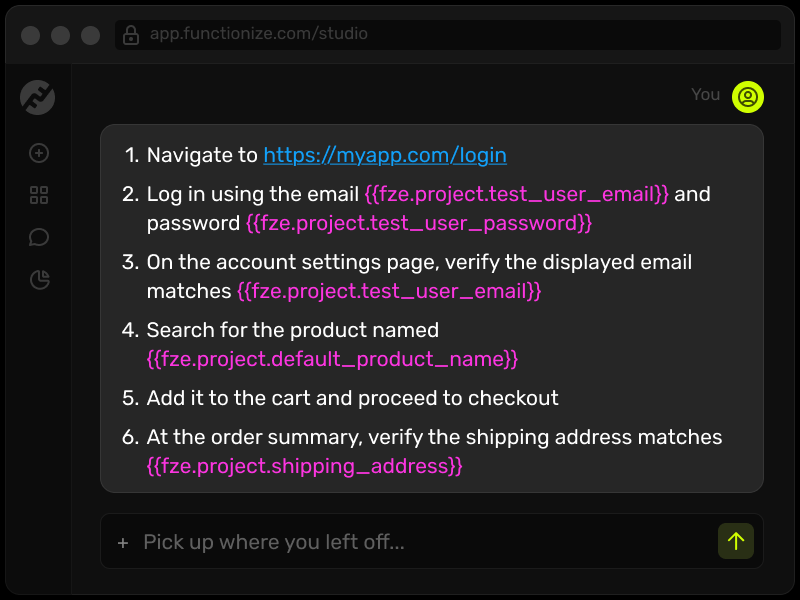
Variables and expressions
Variables extend what a single test can cover. Set one once, then reference it with an expression anywhere else in the same test, or reuse it across other tests in the same project.
Functionize Studio includes prebuilt functions and lets you preview how a variable will evaluate at runtime while you're still building the test, so you know what to expect before the test ever runs.
Test data management
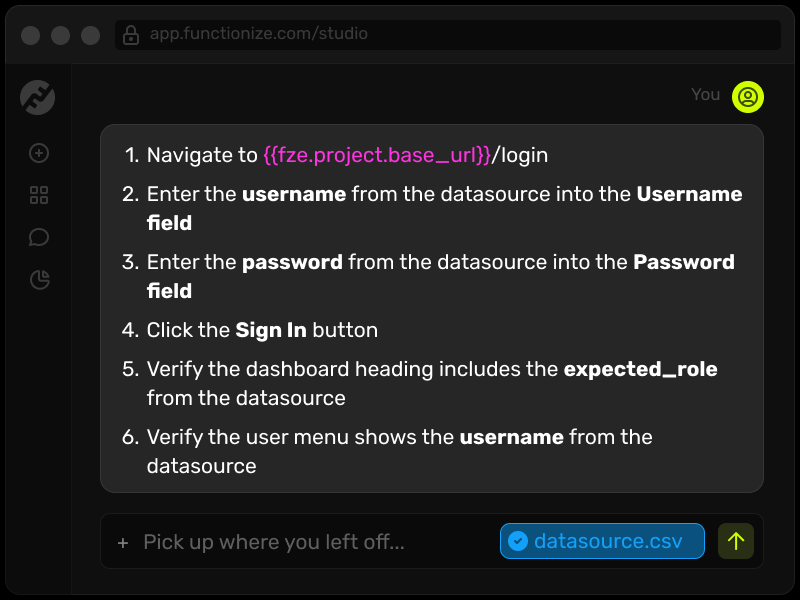
Data-drive a test using records from outside sources instead of hardcoded values. Import a CSV, or connect an external data source, and map fields directly to the steps of your test.
The same dataset can carry through multiple related tests, so a single import covers an entire scenario instead of one isolated check.
Generate random data
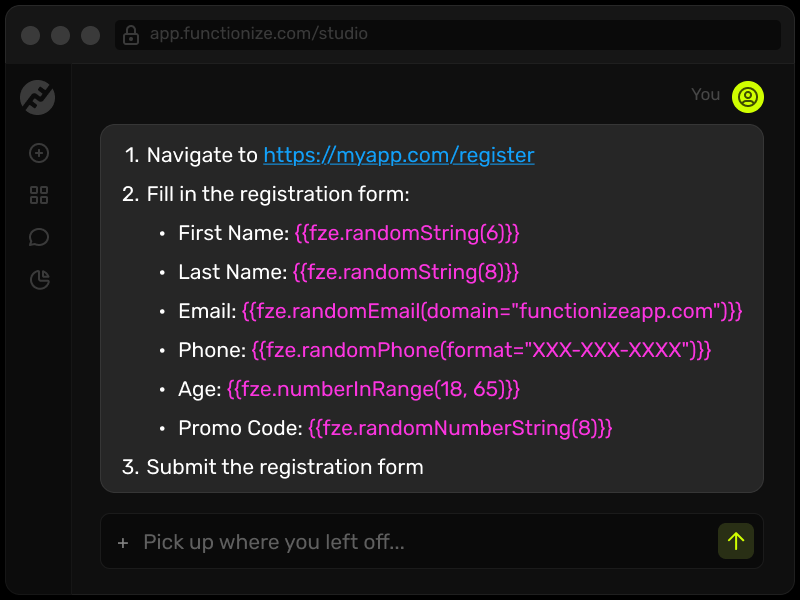
Some tests need a unique value every run, not the same fixed input. Functionize Studio can generate that data on the fly, including working email addresses and phone numbers, so you can verify flows like two factor authentication without maintaining dummy accounts by hand.
You can also generate randomized dates in multiple formats, or specify character counts for mixed text, numbers, and strings, so edge cases show up in testing instead of production.


